How to Sign Up for the RouteBot Mobile App
Download the app, verify email and phone, and turn on the notifications that make login and pickup updates reliable. SMS agreement is required — here's why and how to adjust preferences later.
The mobile app is how drivers run routes and how parents or employees see where the vehicle is and when it is coming. Your transportation provider registers your details and assigns your role. For phone login, you verify the registered number with an SMS code. Trip push notifications and office SMS announcements are separate from login verification.
Want the web product first? Live demo (no signup). For how live maps and ETAs should behave in operations, see live bus tracking buyer's guide. For how automated messages fit into the day, see notification trigger playbook.
Install
Open the download page. On a phone it opens the right store. On a computer it shows the App Store and Google Play options.
The RouteBot companion app is listed in the stores as Servistesin. Servistesin is the companion mobile app used with RouteBot accounts by drivers, parents and employees.
Register
Ask your transportation provider to register your phone number and service assignment. In the app's phone login screen, select your country, enter that number, and request a verification code. Enter the code to sign in. This mobile login does not require creating an email-and-password account.
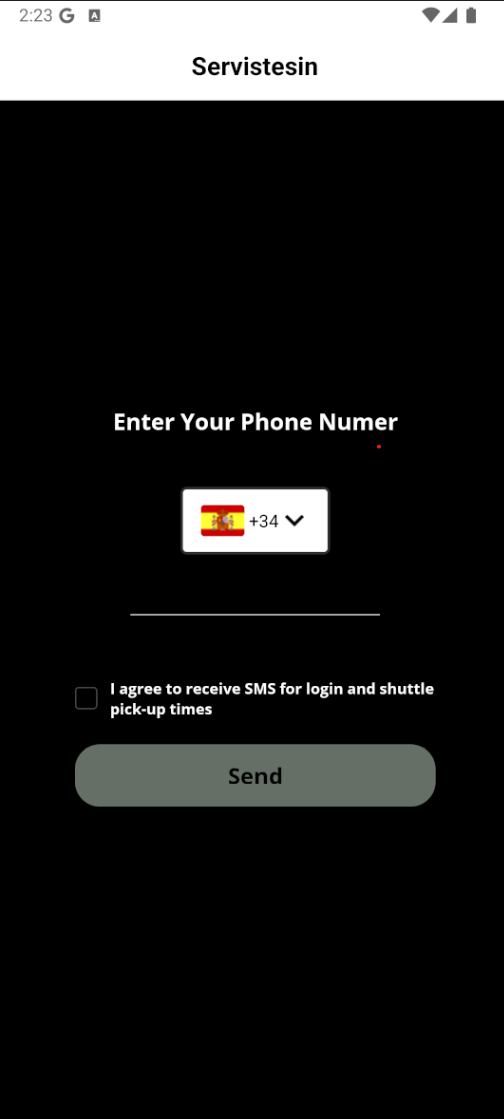
SMS agreement on the pictured screen
The screenshot above shows a version of the phone login screen with an SMS checkbox. Its wording is:
I agree to receive SMS messages for login verification and shuttle pick-up time notifications.
Follow the prompts in your installed version; the login controls can differ from this screenshot. SMS verification confirms your phone number. It does not mean that all trip notifications are sent by SMS.
Why SMS is wired in
- Phone verification: a short code confirms the registered phone number during SMS login.
- Office announcements: your transportation team can use a separate SMS workflow for messages such as schedule changes.
- Trip updates: vehicle approach and school trip events use app push notifications, subject to the relevant settings.
You can still tune which alerts fire inside the app where your organization allows it.
After you are in
After phone verification, the app loads the services associated with your registered profile. Enable notifications to receive the alerts you select. Drivers also need the required location permissions to share the vehicle's position during trips.
If your installed app offers a different login option, ask your transportation provider which method to use. If your services are missing, have the provider check your phone number and assignments.
Notification preferences: open Settings and the notification settings for your profile. Parents can select school trip alerts and approach distance; employees can set vehicle approach alerts. These preferences are separate from SMS login verification.
If something breaks
No SMS: check signal, blocked-sender lists, and that the phone number on the account is current.
App hangs: update from the store, restart, then try again on solid Wi‑Fi or LTE.
Cannot sign in: confirm the registered phone number and country code with your provider. Phone login uses a verification code, so there is no email password to reset in that workflow.
Support
- Phone: +1 (332) 249-2999 (business hours) — account, SMS preferences, urgent app issues.
- In-app help and contact options where available.
Privacy (short version)
We use personal data to run transport accounts — not to sell cold-call lists. SMS traffic is operational. If you have jurisdiction-specific questions (e.g. student data), your organization’s DPA with RouteBot is the binding document; this page is a practical signup guide, not a contract.
Related: School bus tracking app rollout · Docs and help center hub
— Emrah G.